
After 5+ years of blogging, I have discovered so many awesome free blogging tools and resources that I wish I would have known about sooner.
While there are some things that I think you should pay for as a blogger (like hosting and tailwind) there are so many awesome resources that you can use for free!

These free blogging tools include everything from photo editing, finding keywords, pinning and more. So let’s get started, here are my favorite free blogging tools.
Free Blogging Tools I Wish I Knew About Sooner
These blogging tools are great for beginners as well as seasoned bloggers.
Simple Pin Media
There are so many great free resources through Simple Pin Media. Even if you haven’t started a blog yet, but are thinking about it you really need to check out this resource.
I have learned so much and grown my blog because of the tips I have found through Kate. She has an awesome weekly podcast, plus you don’t want to miss her email newsletters and the Simple Pin Pinterest Strategy Group on Facebook is also a great resource.
The Podcast – Each week Kate Ahl shares Simple ways to boost your business using Pinterest on the Simple Pin Podcast. She shares so many great tips, real experiences and she does interviews with so many awesome bloggers and social media experts.

Each of her podcasts is also shared as a blog post on her website along with links to anything she mentions. Get Podcast details here or search Simple Pin Podcast on your podcast app.
Email Series – Kate shares so much useful and relevant information in her emails you definitely want to sign up. Also, you definitely do not want to miss her free yearly Ultimate Pinterest Planner! I used it for the first time last year and it was so helpful! Get the 2020 planner at Simple Pin Media.
Facebook Group – This group doesn’t do any share threads, it’s a group for Pinterest strategy. You will find posts about strategies, what’s working or not working and discussions about the latest Pinterest news.
Canva
Canva is a must-have for bloggers. There is a free version that will work for almost everything you do. This is the program I use to brand all of my photos, create Pinterest and other social media images as well as to create the free and paid printables I offer on my website.
Lightroom App
Pictures we all know the saying that a picture is worth a thousand words right? In blogging, photos can make a brake how well your blog does. Most of my traffic to this blog comes from Pinterest and good photos are key to getting people to click over and read this wonderful content that I have created for ya’ll.
The Lightroom app does have some limitations but it’s great for getting started. You can get beautifully edited photos with the free version of the app.

I take 99% of my photos on my iPhone and edit them in the Lightroom app before taking them to Canva to brand and create images for my social media posts.
There is a Lightroom program you can use on your computer but it isn’t free. If you pay for lightroom you get access to additional features and the program is connected across all of your devices.
CBChatman Lightroom Presets
Okay so first off you should follow cbchatman on Instagram. It’s one of my favorite accounts her kids are so cute, her photography is beautiful, they travel and I could keep going on and on. But just go follow her you can thank me later.

Charlotte is generously sharing her most used Lightroom presets for free. I have just started using her presets and I love how they make my pictures look. For the most part, they are one click edits and only once in a while do I need to make a few little changes.
Tailwind for Pinterest
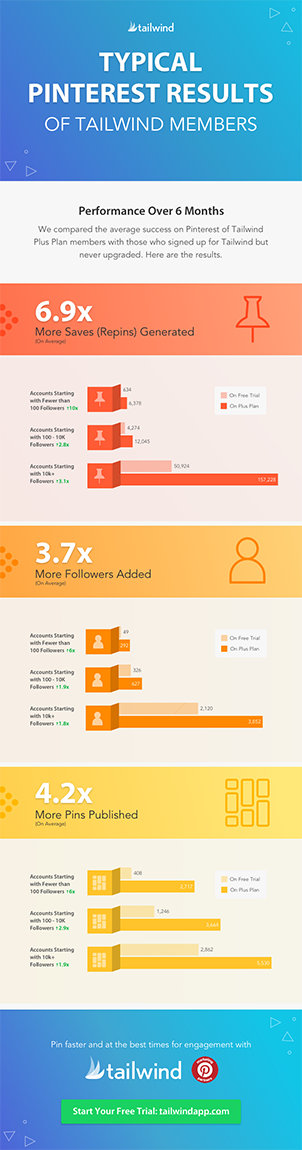
I know, I know before you tell me tailwind isn’t free, let me explain, why it’s on this list of free resources! I used tailwind for a year before I started paying for it. If you can it’s something I do think it’s worth paying for once you have enough posts, but if it’s not in the budget you can still get a lot of benefit from using it for free.
Use tailwind for free by starting with the free tailwind trial this allows you to schedule and pin 100 pins. After your first 100 pins are shared you can still schedule pins they just won’t automatically share.

Continue to use tailwind by filling up your queue and go into your Tailwind account and hit pin now. This isn’t the easiest or best Pinterest strategy but it does work when you’re just starting out plus you get access to tailwind tribes!
Try scheduling your pins on tailwind for free if you haven’t already.
Along with scheduling pins, you also get access to more analytics. I love being able to see how my profile is doing overall and see what boards are doing the best with Tailwind Insights.
Tailwind Tribes
Tailwind tribes are a great way to get your content seen by others and shared. With the free tailwind plan, you get access to 5 tribes and you can submit 30 pieces of content for free each month. To be able to add more content and be in more tribes you will need to pay for a powerup.

There are a lot of mixed reviews on if power ups are worth it or not. I personally think it depends on how much content you have. So if you’re just starting out you should be good with the number of tribes and submissions you get for free. Join Now
Facebook Groups
Facebook groups are a great way to learn about blogging, ask questions and make blogging friends. There are tons of blogging Facebook groups out there and honestly the best way to find a group you like is to join a bunch of different groups and leave the ones that you just don’t click with.
A few of my favorite Facebook (mom) Blogger Groups are:
Google Analytics
Google Analytics is the most widely accepted analytics for tracking page views. You can create a free analytics account as soon as you create your blog.
Google Analytics allows you to track page views and see where the views are coming from. If you want to be able to make money from your blog at some point then Google Analytics is a must-have free blogging tool.
Pinterest Insights
If you don’t have a Pinterest business account go get one right now. Here are some instructions on setting up your account.
The Insights you can get from your Pinterest analytics are helpful in knowing what content pinners like. It’s a great place to start when you need content ideas.
Pinterest users love fresh Pins! Repurpose your content with new seasonal images. Here’s how!
Free Stock Photos
Free stock photos are great for when you don’t have a photo to go with your post. There are a lot of stock photo sites out there some are free and others have paid subscriptions.

Here are a few of my favorite Free Stock Photo Websites:
- StockSnap.io
- Pexels
- Pixabay
- Foodiesfeed
- Canva also has some free stock photos
Grammarly
Grammarly is a free Chrome extension that helps improve your writing. Grammarly helps you eliminate errors in your writing by checking grammar and spelling as well as style and tone. It’s a tool that is a must-have when you’re writing a lot.
Yoast SEO
Yoast SEO is a plugin that you need if you have a WordPress website. (check out why you should start a blog on WordPress here.)
There is a free and a premium paid version of Yoast. The free version of Yoast has plenty of information for most of us.
This plugin helps with keyword optimization, it checks readability and a lot more you can get the whole list of what the plugin does on the Yoast website.
Google Calendar
Google Calendar is one of my favorite ways to organize content ideas, deadlines and to keep track of when I have blog posts already scheduled for.
I like using Google Calendar, Docs, and Drive to help keep me organized. I also use a planner and a lot of notes because I’m crazy like that and love my physical lists.
Tailwind for Instagram
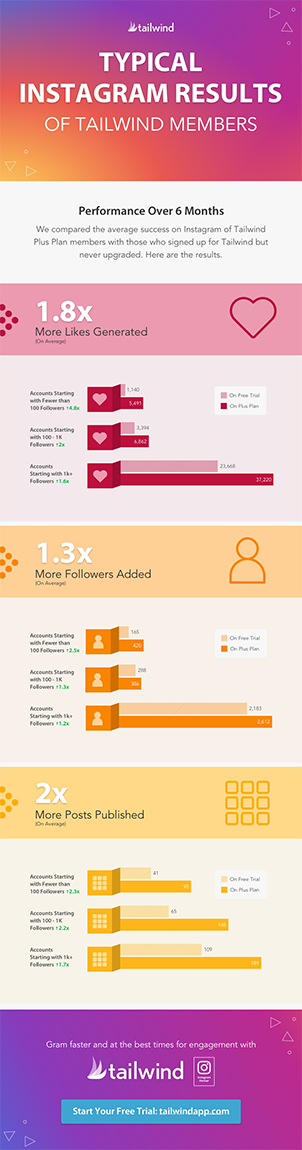
Just like Tailwind for Pinterest, you can get a free trial of Tailwind for Instagram. The Instagram trial allows you to schedule and automatically publish 31 posts before you need to decide if you want to pay for the program.

While it’s nice to be able to schedule Instagram my current favorite Tailwind for Instagram tool is the Smart.bio, and guess what?!?! the Smart.bio is free FOREVER!
Smart bio allows you to get the most out of the one (1) URL you can use in your Instagram bio. You set up the smart bio page through tailwind and you can add button links, Instagram post links and you can even customize the color of the buttons.
Smart.bio is the most powerful FREE Instagram bio linking tool. Grab yours today!
Mailchimp
I remember when I first started my blog I read so many posts saying to start an email list. While I didn’t start a list at first it took me a few years to create a freebie and start collecting emails.

Even once I started collecting emails I never knew what to send them. In the past couple of months after having some emails for 2+ years, I started sending out an email newsletter. My email list is about 1,000 people and to be honest I haven’t been trying to build it.
Next year building my list is one of my goals and being more consistent with email newsletters. Mailchimp is the program I have chosen to use for my newsletter right now. The free package has enough features to get started and works until you have over 2,000 contacts.
Blog Clarity
I mentioned the blog clarity facebook group above and it is a really great group. But now I want to talk about the website.
On the Blog Clarity website Melissa shares so much good information about all different aspects of blogging. She has such a fun personality and so much knowledge that I love learning from her.
She has blog posts with great information and her newsletter is always filled with awesome information.
TwinsMommy
TwinsMommy is another great source of information and ideas for new bloggers and those of us still learning. Elna has an awesome Blog Traffic Planner you can get for free by signing up for her newsletter and she also has an awesome facebook group.
While I know there are countless other free blogging tools out there these are some of my favorites and ones I wish I would have known about earlier in my blogging journey.
Save this post and help someone else find these free Blogging Tools!

Thinking of starting a blog this year? Bluehost is who I recommend setting up your blog with. Here is a post all about purchasing your domain and hosting.
You might also enjoy:
7 Reasons to Start Your Blog with WordPress instead of Blogger
These are really great ideas! Thank you!
Tailwind, YES!! And Podcasts are such great free resources! Also, thanks for sharing our group!!
Thank you, I have learned a lot from the Facebook group but also feel like I’ve found some blogging friends.