
Pinterest recently released a new feature that is awesome for new bloggers. You can schedule pins with in your pinterest business account for free.

This is such an awesome resource for those that don’t want to spend money on a Pinterest scheduler. So let’s get to the details of how many pins you can schedule for free and how do you do it.
How Many Pins Can you Schedule for Free on Pinterest
Right now you can have up to 30 pins scheduled at a time. Pins can be scheduled out two weeks in advance.
This is great for new bloggers that don’t yet have a lot of content or for those manually pinning to be able to have a few pins scheduled.
How to Schedule Pins on Pinterest
You can schedule pins both on desktop or ios devices. You can only schedule one pin at a time so it’s not as quick and easy as Tailwind.

To schedule your pin you can click the red + on the top navigation bar and selecting create a pin, or by going to the pins tab on your profile and selecting create pin.

Select an image or video for your pin and add a destination URL. You will also want to add a title and description for your pin.
New just select Publish at a later date and choose the day and time you would like the pin to be published. Then click Save.

How to View Scheduled Pins
Now that you have scheduled your pin you can view and edit it by going to the Pins tab in your profile.

Clicking on one of the scheduled pins will take you to a scheduled pins page. Clicking on a specific will allow you to delete the pin or publish it now.
You also have the option to create a new scheduled pin on this page.

Is this the Best Way to Schedule Pins?
While I think that being able to schedule pins for free on Pinterest is a great recourse it is not my favorite way to schedule pins.
Only being able to schedule 1 pin at a time and have only 30 scheduled is a drawback when you have a large number of posts you are promoting.
I have been trying to use the scheduled pins to see if Pinterest favors pins scheduled with their scheduler. I haven’t noticed any difference, so the time it takes to scheduling pins with the scheduler on Pinterest is not worth it to me.
Scheduling Pins Quick and Easy
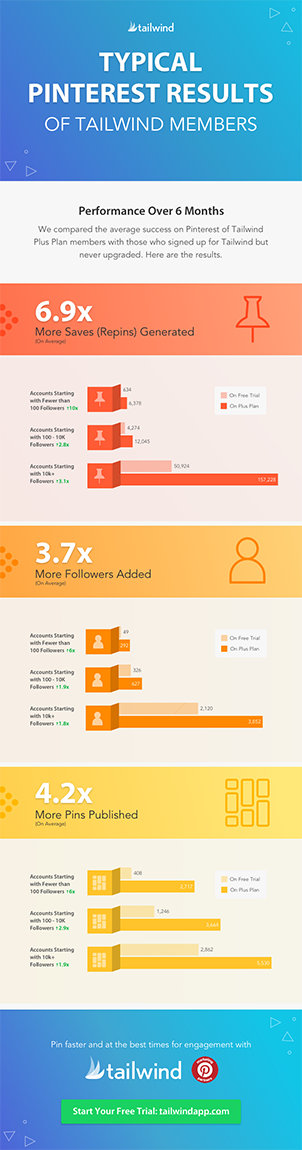
My favorite way to schedule pins to Pinterest is by using Tailwind. Tailwind not only allows me to schedule as many pins as I want each day but also allows me to schedule 1 pin to multiple boards in less than a minute. (Get a free trial of tailwind, no payment information required.)

I schedule between 30-50 posts a day on tailwind in about an hour a week. Using this program has helped me reach over 2 million monthly viewers on Pinterest and grow my blog traffic.
Tailwind is more than a Scheduler
Tailwind is more than just a scheduler. The program keeps track of when you last pinned a post to each board as well as giving you additional resources including:
- Profile Performance
- Pin Inspector
- Board Insights
- Monitor Your Domain
- Access to Tribes
What if I Don’t Want to Pay for Tailwind?
That’s totally fine. I used tailwind for almost 6 months before deciding to pay for it. You can get a free trial of tailwind without having to enter any payment information.
The free trial of the Tailwind Plus Plan lets you schedule and publish up to 100 Pinterest Pins. The trial can last a few days or a
After the 100 pins are used you can still schedule pins using tailwind they just will not publish automatically. You will have to go into your account and click publish now for them to post.
If you don’t have a tailwind account yet go start your free trial even if it’s just so you can use Tailwind Tribes! Join my Mom Life Tribe here.
Using Tailwind tribes has helped me get my pins shared to my target audience and increase my reach on Pinterest.
Save this post!
